Keys
Concepts of Keys
When working with translation keys, it’s important to understand several key concepts that help organize and improve translation quality:
-
Code
The unique identifier for each translation key, used to reference the text in your application’s code. -
Context
Descriptions or notes that provide translators with additional information about where and how the key is used, ensuring accurate translations. This is used in the AI translations as well. -
Tags
Custom labels that help group and categorize keys for easier filtering and management, such ashomepage,error-messages, orbuttons. -
Plurals
Support for language-specific pluralization rules, allowing translations to correctly handle singular, plural, and other forms depending on the language. Plurals are defined differently for different languages, for example English hasoneandother, while Russian hasone,few,many, andother. This is crucial for languages that have complex pluralization rules.When editing a plural, different variables can be used for indicating the
countvariable, however we recommend using the#for this, as it provides the most flexibility and power.Example:
- Other
You have # new messages. - One
You have one new message.
When exporting the translations, different formats will handle plurals differently. For example, JSON and YAML formats will include the plural forms as separate keys, while PO files will use a different syntax.
- Other
-
Max length
Optional character limits to prevent layout issues in your UI by warning translators if a translation exceeds the allowed length. -
Namespace
If namespaces are enabled for your project, you can assign keys to a namespace to organize them into logical groups. This helps with filtering, management, and namespace-based exports. Learn more about Namespaces.
Creating new keys
There are multiple ways of creating new keys. You can either create them manually from our UI, or upload content files directly if you have a larger set of translations to be imported.
Create manually
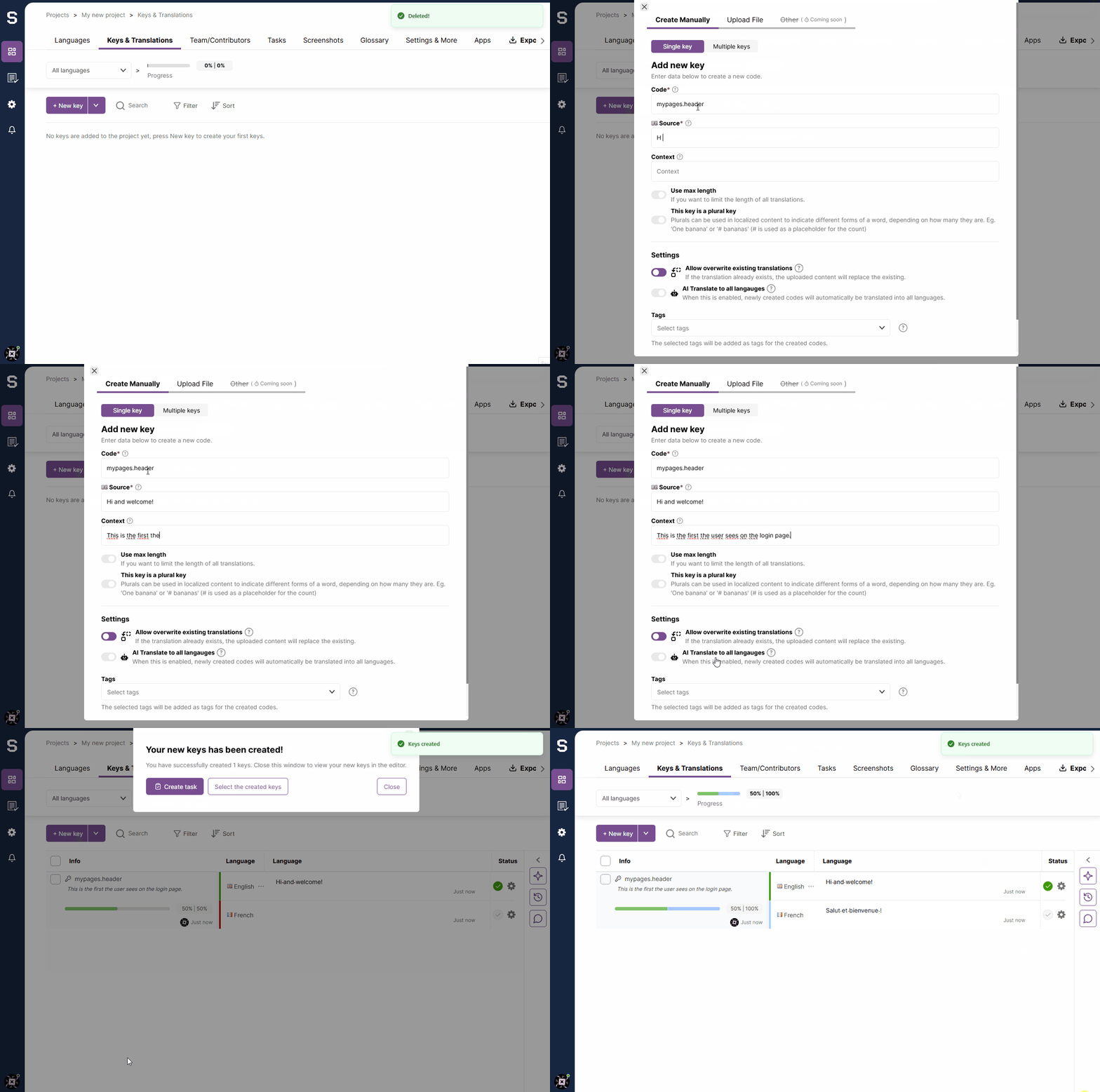
Import from file
You can import keys from a file in various formats, such as JSON, YAML, or .po-files. This is useful for bulk importing translations or when you have existing translation files. If you have multiple files, you can upload them as a zip file. The system will automatically detect the file format and import the keys accordingly.
Searching and Filtering Keys
The editor provides powerful search and filtering capabilities to help you find and manage keys efficiently:
Search Options
- Text Search: Search for keys by their code or translation text across all languages or specific languages
- Language-Specific Search: Limit your search to specific languages to find untranslated or unreviewed content in particular languages
Filter Options
- Review Status: Filter keys by whether translations have been reviewed (
reviewedornot reviewed) - Translation Status: Filter keys by whether translations exist (
translatedornot translated) - QA Issues: Filter to show only keys that have QA (Quality Assurance) issues, making it easy to identify and fix problems
- Tags: Filter keys by one or more tags. When multiple tags are selected, only keys that have all specified tags will be shown
- Namespace: If namespaces are enabled, filter keys by namespace to focus on specific features or modules
Sorting
Keys can be sorted by various criteria:
- Creation date
- Key name/code
- Review status
- Translation status
- Translation update date
- Key ID
These search and filter capabilities make it easy to manage large projects and focus on specific subsets of keys that need attention.